 CBS News Miami ·
 Engineer's website exposes Brickell Bridge rush hour gridlock in Miami
One local engineer built a real-time website to prove it.
Check current bridge status and explore recent activity at supported bridges.
Check your bridgeCurrent status without sign-up. Today's history with a free account.
Open the app to browse supported bridges.
Open the app to browse supported bridges.
Sources vary by bridge: regional feeds such as FL511 and SDOT, plus community reports. Sources can be delayed or unavailable. Check the source status in the app; time since a bridge event is not data freshness.
Explore supported bridges in South Florida and Seattle on the map. You can request a bridge that is not listed.
Suggest your bridgeYes. Basic status checks need no account or installation. Pro adds historical detail, vessel signals where available, and an ad-free experience. It is optional.
See what Pro addsAs seen in the press
CBS News Miami · One local engineer built a real-time website to prove it.

A platform built to answer one very Miami question.

Miami's oldest and largest tech community, 16,000+ members.

Anticipate openings and plan alternative routes.
Choose the view that works best for you.
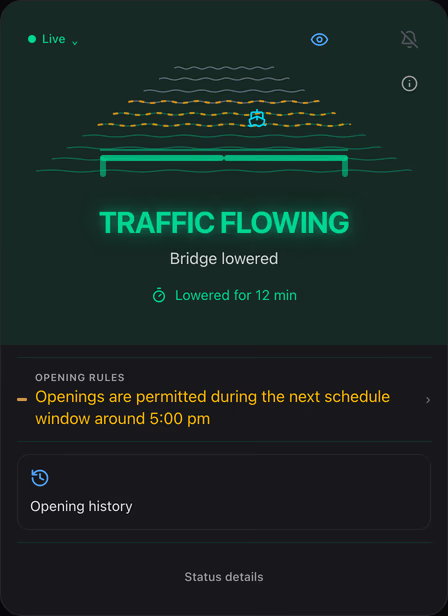
Current status and important signals for a quick glance.
See the current status first, with important vessel and historical signals kept in context.
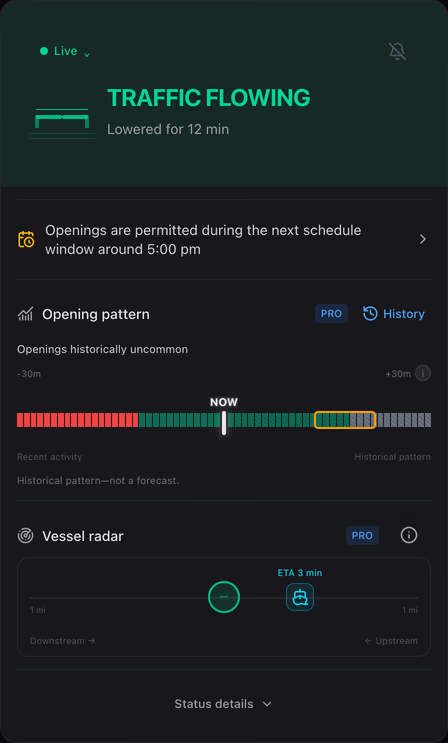
More detailed history, vessel radar, and additional data. Availability depends on the bridge and your access.
Simple and Advanced are view modes—not plans. You can change your view anytime in Profile → Experience mode. Features marked Pro still require Pro.
Explore the context behind the status.
Today’s event list is free with an account. Pro adds historical patterns and weekly/monthly opening-count summaries, not individual event lists for those periods. Patterns do not guarantee what happens next.
Example · explore available data in the app
Explore nearby vessels where radar is available. A nearby vessel is an additional signal, not a guarantee that the bridge will rise.
Example · explore available data in the app
Bridge-status alerts are free. Pro adds vessel-approach alerts where supported; a vessel signal does not guarantee an opening or a particular lead time.
Notification setup depends on your browser. On supported iPhones, add the app to your Home Screen first.
No ads, no distractions. Just clean, instant bridge status. Focus on what matters — getting where you need to go.
Compare the elapsed time of a current raise with the typical range from available bridge history. This shows a pattern, not a prediction or countdown to lowering.
12 min elapsed
Past openings—not a countdown.
Illustration: 287 historical raises. Elapsed time is not remaining wait time.
Example. Actual history and availability vary by bridge.
The same Pro access with every option. Data and feature availability vary by bridge.
$0
For new, eligible accounts: 14 days of Pro for $0. No card required. The trial ends automatically, with no charge.
Get Started50 pts
24 hours of Pro from activation for 50 points. Creator Mode is not required.
No credit card
Learn MoreInvite friends, earn points
Eligible referrals earn 15 points toward driver benefits, including a 50-point Pro day pass. One referral alone does not cover a day pass.
Regional feeds, including FL511 in Florida and SDOT in Seattle, and community reports help inform bridge status. Coverage and source availability vary. The app distinguishes current sources, delayed data, and last-known status.
Selected comments from our Facebook community. Names and photos omitted; some comments are excerpts.
“I just checked it. Said bridge was up, and I could visually confirm that it was. Kudos. Will keep testing it 👍”
“Smart to use the boat tracker!”
“This is AMAZING, I live too close for comfort to this bridge and it is such a headache.”
New features, bridge data drops, and behind-the-scenes — posted a few times a week. Pick your platform.
A few details before your next crossing.
Current bridge status is free without signing up. Today’s opening history is available with a free account. Pro is optional.
Sources vary by bridge and may be delayed or unavailable. Check the source information in the app. The time since a bridge was raised or lowered describes an event, not the freshness of the source.
A Pro day pass costs 50 points and lasts 24 hours from activation. You do not need Creator Mode. Review the details in the app; following a link here does not spend points.
No. Open the app on its app domain to check status. For quick access, follow the installation instructions in the app. Installation options vary by browser.
Use the map or bridge catalog to explore supported bridges in South Florida and Seattle. If your bridge is not listed, use Suggest your bridge below.
Pro adds historical patterns, weekly and monthly opening-count summaries, vessel signals where available, and an ad-free experience. Today’s event list is available with a free account; week and month views show summaries, not individual event lists. Historical patterns do not guarantee an opening. Plans are $4.99 monthly or $29.99 billed yearly; subscribing is optional.
Open the app, select your bridge, and choose notifications. Permission and bridge preferences are separate from installation. On supported iPhones, web push requires the app on your Home Screen. See the steps below.
New, eligible accounts get 14 days of Pro for $0. No card required. Your trial ends automatically, with no charge. You can continue with free status checks or choose to subscribe.
Simple shows the current status and important signals for a quick glance. Advanced offers more detailed history, vessel radar, and additional data. Availability depends on the bridge and your access. You can change your view anytime in Profile → Experience mode.
Tell us which drawbridge affects your trips. Requests help us decide which bridges and cities to evaluate next.
Opens Google Forms in this tab. Use Back to return. Google may ask you to verify or sign in depending on its access settings.
Check status in your browser without installing. For Home Screen access, open the app first and follow its installation guide. Then choose alerts for your bridge.
Open the app to add it to your Home Screen1. Open the app
Use the app domain, not this landing page
2. Add to Home Screen
On iPhone: Share → Add to Home Screen
3. Set up bridge alerts
Open the installed app and choose your bridge
On supported iPhones, web push needs the Home Screen app. Other browsers may offer an Install option. Notification permission and bridge preferences are separate steps.
Open the app and choose your bridge. Basic status checks are free, with no sign-up or installation required.